Dual Dash Changelog
See the latest product updates, improvements, and fixes across Dual Dash.
More Control, Better Follow-Through
New: Role-Based Access Management
Executives can now control which Dual Dash features Managers and Employees have access to.
Introduce features at your own pace and tailor Dual Dash to each role.
New: To Do List
Everyone now has a personal To Do List for everyday tasks.
- Add a task and set a due date
- Get a notification when something is coming due
Use it for the small things you need to remember without creating a full Work Plan.
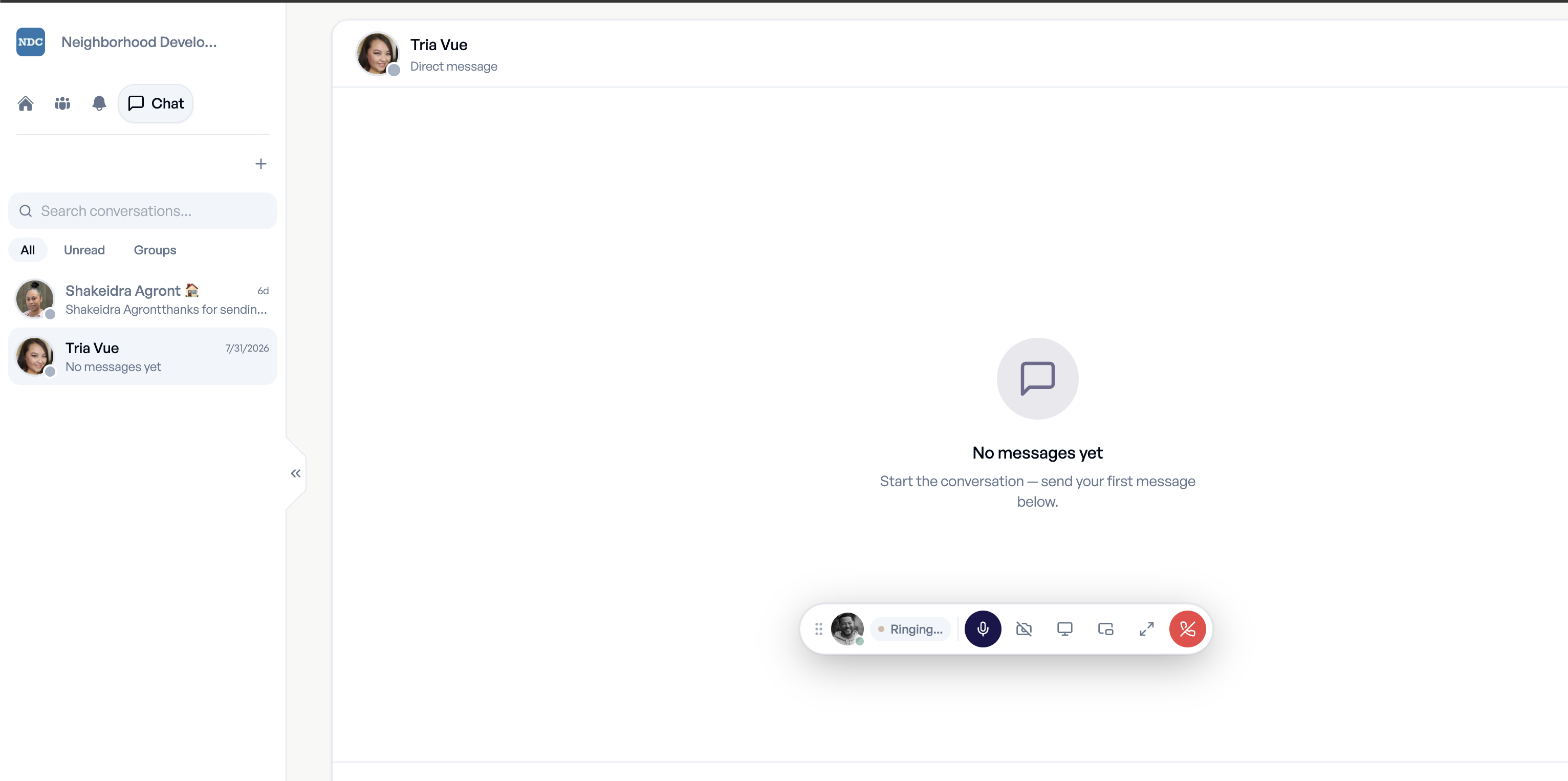
Improved: Floating Video & Audio Bar
Minimized video and audio calls now move into a floating bar that stays out of the way.
Keep talking while you update agendas, assign work, save changes, send information or move around Dual Dash.

Better Onboarding & Meeting Management
New: Welcome Emails
Admins can send new users a guided welcome email with clear steps for getting started:
- Logging in to Dual Dash
- Setting up their account
- Connecting their calendar
- Accessing Dual Dash University
New users start with confidence, which improves adoption from day one.
Improved: Meeting Cards
1:1 and Group Meeting cards have been redesigned to be easier to read at a glance. Each card now shows whether the meeting is one-time or recurring, so you can find the right one faster.
Improved: Meeting Management
Meeting organizers, Managers and Executives can now:
- Edit meetings
- Copy meetings
- Delete meetings
- Copy a meeting link to share with participants

Action Items Now Integrated with Work Plans
Improved: Action Items now live in Work Plans
Action Items created during 1:1s and Group Meetings are now managed directly in Work Plans.
- One place to manage delegated work
- Track progress from assignment to completion
- A simpler workflow for leaders and employees
Fixed
- Communication Tools could disappear.
- An issue affected Values within meetings.

Google Calendar Integration & Performance Reviews
New: Google Calendar Integration
Connect Google Calendar to schedule and manage 1:1s and Group Meetings from your existing calendar.
New: Performance Reviews (Version 1)
The first version of Performance Reviews is available, giving leaders a structured way to run and manage employee reviews.
New: Images in Work Plans
Attach images directly to Work Plans to:
- Document progress
- Provide context
- Share examples
- Verify completed work
Conversations, commitments and supporting information stay together in one place.
Improved: Agenda Topics
Updated styling and readability make meetings easier to navigate and discussions easier to follow.

Group Meetings & Private Notes
New: Group Meetings
Organize and run recurring team meetings such as:
- Daily huddles
- Weekly team meetings
- Monthly operating reviews
Each meeting has a shared agenda, and every agenda item can be tagged so participants know its purpose before the meeting starts:
- Informational
- Input requested
- Voting item
Improved: Private & Shared Notes
Take both private and shared notes in 1:1s and Group Meetings.
- Shared notes are visible to all participants, for collaboration and alignment.
- Private notes are visible only to you, for your own thoughts, context and follow-up.

Ideas
New: Ideas
Capture and act on feedback from employees at every level.
Users can:
- Submit ideas publicly or anonymously
- See ideas shared across the team
- Upvote or downvote ideas
Leaders can:
- Review submitted ideas
- Approve or decline them
Ground-up feedback now has a clear path to a decision.
Note: Performance Reviews
Performance Reviews were planned for this release but needed more work. They shipped on June 12, 2026.

Meetings, KPIs, and Performance Visibility
New: 1:1 Meetings with Video & Audio
Run 1:1s directly inside Dual Dash with built-in video and audio.
- See the agenda and meet in the same place
- No external meeting tools needed
- Call notifications appear when both people are logged in
- Receive calls from anywhere in the app
Improved: KPI Library in Success Drivers
KPIs now live in one central library.
- See every KPI in one place
- Assign KPIs to roles as needed
- Keep KPIs consistent across the organization
- Sort by leading or lagging indicators
Improved: High Performance Line on Individual Scorecards
Individual Scorecards now show a High Performance Line, the top benchmark within the location, so employees can see what top performance looks like.
Improved: Calculated KPIs for Departments & Locations
KPIs now calculate automatically at the Department and Location level, with no manual roll-ups and real-time visibility into team and location performance.

Growth Plans, Employee Detail Updates, and Survey Sentiment Sorting
New: Growth Plans
Growth Plans connect employee development directly to performance. Each plan aligns a person to:
- KPIs (results)
- Performance Drivers (behaviors)
- Technical Skills (capabilities)
Plans are reinforced in 1:1s, so development becomes part of ongoing coaching and accountability.
Improved: Employee Detail Pages
Employee Detail pages now show the full Success Drivers framework (KPIs, Performance Drivers and Technical Skills), so managers and employees see expected results, how the work gets done, and which skills are being developed, all in one place.
Improved: Sort Survey Questions by Sentiment
Survey questions can now be sorted by sentiment score. Dual Dash calculates sentiment on a -2 to +2 scale:
- Strongly Disagree = -2
- Disagree = -1
- Neutral = 0
- Agree = +1
- Strongly Agree = +2
Unlike a simple 1–5 average, sentiment scoring shows where feedback is trending positive or negative, so leaders know where to act first.

Notifications, @Mentions & Success Drivers
New: In-App Notifications
Get notified inside Dual Dash about surveys, due dates and other important events, so nothing slips through the cracks.
New: @Mentions
Tag teammates in comments with @mentions. Each mention includes a link that takes them straight to the comment.
Improved: Success Drivers
The header navigation is simpler, and KPIs, Performance Drivers and Technical Skills now live together in one area called Success Drivers.
Improved: Technical Skills connected to Jobs
Define the specific skills each role requires and build clearer development paths for employees.

Surveys, Private Goals & Goal Auto-Archiving
New: Surveys
Surveys in Dual Dash are built to improve performance, not to produce reports that sit unread.
- Results flow directly into 1:1 coaching
- Filter insights by performance level instead of relying on company-wide averages
See how your team feels and what is slowing your best people down, then act on it.
New: Private Goals
Goals can now be kept private. This was a direct customer request.
Improved: Auto-Archiving for Goals
Goals archive automatically to keep Work Plans clean and focused.

Calendar Links, Work Plan Filters & Dual Dash University
New: Dual Dash University
A self-guided learning hub with guides, walkthroughs and FAQs so teams can learn at their own pace.
Improved: Clickable Calendar Links
Jump straight from the Calendar into due dates, 1:1s and work anniversaries.
Improved: Work Plan Filters
Filter Work Plans by tags, teams, status and approaching due dates.

Kanban View for Work Plans
New: Kanban View for Work Plans
Drag and drop projects between stages. Status updates automatically and collaborators are notified in real time.
Improved: Dashboard
- Widgets are resized for a more uniform layout
- Cards being dragged now appear above the dashboard instead of beneath it
Improved: Training
The Welcome Video series was removed in preparation for Dual Dash University, the new help center for product training, onboarding and support.

Outlook Integration & 1:1 Reporting
New: Outlook Integration
1:1 meetings now sync to Outlook, with a direct link back into Dual Dash.
New: 1:1 Reporting
Managers can see coaching consistency with new 1:1 reporting on completion, sentiment, stress and quality scores.
New: Goal Detail Pages
Goals now have full detail pages you can share with your team.
Improved: Vision Statement
Employees see your Vision statement every time they log in.
Improved: Calendar Widgets
Calendar widgets now show due dates and 1:1s so priorities stay visible.